Raspberry Pi 1 Model B specs, pinout & datasheets
The board that started it all: a $35 Linux computer the size of a credit card, launched in February 2012 with 256 MB of RAM and doubled to 512 MB that October.
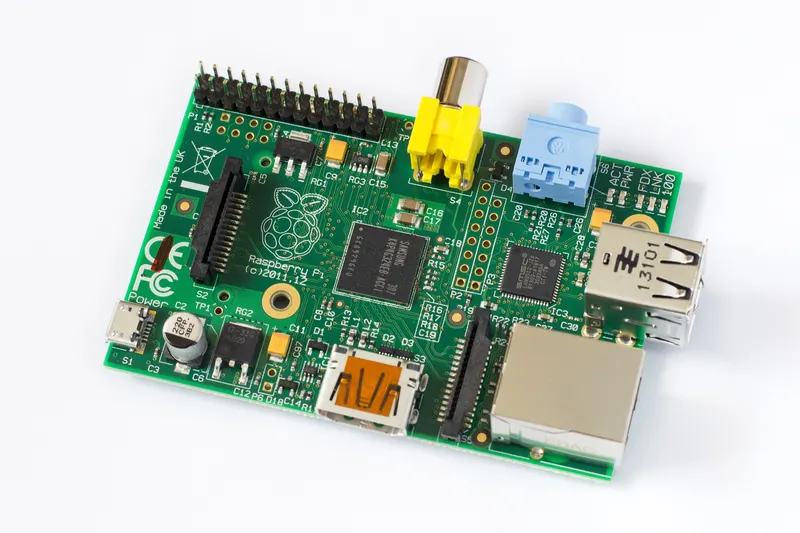

- Chip / SoC
- Broadcom BCM2835
- CPU
- Arm1176JZF-S (ARMv6), single core
- Clock
- 700 MHz
- RAM
- 256 MB; 512 MB from October 2012
- Storage
- Full-size SD card
- I/O voltage
- 3.3 V
- Released
- February 2012
- Status
- Retired
Specs checked against the cited sources on 1 October 2026 (AI-assisted source check). Spotted a mistake? Use the form at the end of the page.
Specifications
- Chip / SoC
- Broadcom BCM2835[1]
- CPU
- Arm1176JZF-S (ARMv6), single core[5]
- Clock
- 700 MHz[5]
- RAM
- 256 MB; 512 MB from October 2012[1]
- Storage
- Full-size SD card[1]
- GPIO
- 26-pin header (P1)[1]
- I/O voltage
- 3.3 V[2]
- Input voltage
- 5 V via micro-USB[1]
- Ethernet
- 100 Mb/s[1]
- USB
- 2 × USB 2.0[1]
- Video
- HDMI and RCA composite; DSI display connector[1]
- Expansion
- CSI camera connector[1]
- Dimensions
- 85.6 × 56.5 mm[5]
- Launch price
- US$35[5]
Can I still use it?
- Raspberry Pi OS
- Supported[6]32-bit image; the 64-bit image needs a 64-bit model such as the Pi 3 or later.
As published by each project, checked weekly. A platform not listed has no published information here, which is not the same as no support.
Datasheets and documents
Pinout
- Power
- Ground
- GPIO
- Special
- Not connected
Pin table (26 pins)
| Pin | Label | Kind | Functions |
|---|---|---|---|
| 1 | 3V3 | Power | |
| 2 | 5V | Power | |
| 3 | GPIO2 | GPIO | I2C1 SDA |
| 4 | 5V | Power | |
| 5 | GPIO3 | GPIO | I2C1 SCL |
| 6 | GND | Ground | |
| 7 | GPIO4 | GPIO | GPCLK0 |
| 8 | GPIO14 | GPIO | UART TXD |
| 9 | GND | Ground | |
| 10 | GPIO15 | GPIO | UART RXD |
| 11 | GPIO17 | GPIO | |
| 12 | GPIO18 | GPIO | PCM CLK, PWM0 |
| 13 | GPIO27 | GPIO | |
| 14 | GND | Ground | |
| 15 | GPIO22 | GPIO | |
| 16 | GPIO23 | GPIO | |
| 17 | 3V3 | Power | |
| 18 | GPIO24 | GPIO | |
| 19 | GPIO10 | GPIO | SPI0 MOSI |
| 20 | GND | Ground | |
| 21 | GPIO9 | GPIO | SPI0 MISO |
| 22 | GPIO25 | GPIO | |
| 23 | GPIO11 | GPIO | SPI0 SCLK |
| 24 | GPIO8 | GPIO | SPI0 CE0 |
| 25 | GND | Ground | |
| 26 | GPIO7 | GPIO | SPI0 CE1 |
Gotchas
- Revision 1 and 2 GPIO differ. Three header pins changed between revisions: pin 3 and 5 are GPIO0/GPIO1 on revision 1 but GPIO2/GPIO3 on revision 2, and pin 13 is GPIO21 on revision 1 but GPIO27 on revision 2. Old tutorials often assume one or the other.[7]
- ARMv6 only. The BCM2835 is ARMv6. Many Linux distributions only ship ARMv7 or 64-bit Arm builds, so use 32-bit Raspberry Pi OS.[5]
- 3.3 V only. The GPIO pins are 3.3 V. Do not connect 5 V signals or components to them.[2]
- Little current per pin. Each GPIO pin can supply up to about 16 mA and all pins together about 50 mA; drive motors and other loads through a transistor or driver board.[3]
What changed
Next came the Raspberry Pi 1 Model B+
| Spec | Raspberry Pi 1 Model B | Raspberry Pi 1 Model B+ |
|---|---|---|
| RAM | 256 MB; 512 MB from October 2012 | 512 MB |
| Storage | Full-size SD card | microSD card |
| GPIO | 26-pin header (P1) | 40-pin header |
| USB | 2 × USB 2.0 | 4 × USB 2.0 |
| Video | HDMI and RCA composite; DSI display connector | HDMI; composite on the 3.5 mm AV jack; DSI display connector |
| Dimensions | 85.6 × 56.5 mm | — |
Power and battery
Size and mechanical
- Board size
- 85.6 × 56.5 mm[5]
Revision 1 boards have no mounting holes; revision 2 added two.
Revisions
- Revision 1.0
- February 2012: 256 MB of RAM. The I2C pins on P1 are GPIO0 and GPIO1, and pin 13 is GPIO21.[7]
- Revision 2.0
- September 2012: I2C moved to GPIO2 and GPIO3, pin 13 became GPIO27, and mounting holes were added. Still 256 MB at first.[7]
- Revision 2.0, 512 MB
- October 2012: Memory doubled to 512 MB at the same price.[4]
History and use today
History
Raspberry Pi was created by a UK charity to get children programming again. The Model B went on sale on 29 February 2012; demand crashed the distributors' websites, and it shipped with 256 MB of RAM until the 512 MB version replaced it at the same price in October 2012.[5]
Still useful for
Slow by modern standards and limited to 32-bit software, but fine for a headless sensor logger, a retro emulator for 8-bit systems, or learning GPIO basics with Python. Pick a Zero 2 W or Pi 4 for anything that needs a desktop or modern web browser.
Sources
- Raspberry Pi hardware introduction (documentation source)
- GPIO and the 40-pin header, Raspberry Pi documentation (source)
- Power supplies, Raspberry Pi documentation (source)
- Model B now ships with 512MB of RAM, Raspberry Pi news
- Raspberry Pi, Wikipedia
- Raspberry Pi OS downloads, Raspberry Pi
- Upcoming board revision, Raspberry Pi news
Spotted a mistake?
Every report is read by a person and checked against a source before anything changes. Please link one if you have it.