Raspberry Pi 4 Model B specs, pinout & datasheets
The Pi that became a real desktop: Cortex-A72 cores, up to 8 GB of RAM, USB 3.0, gigabit Ethernet and two 4K displays.
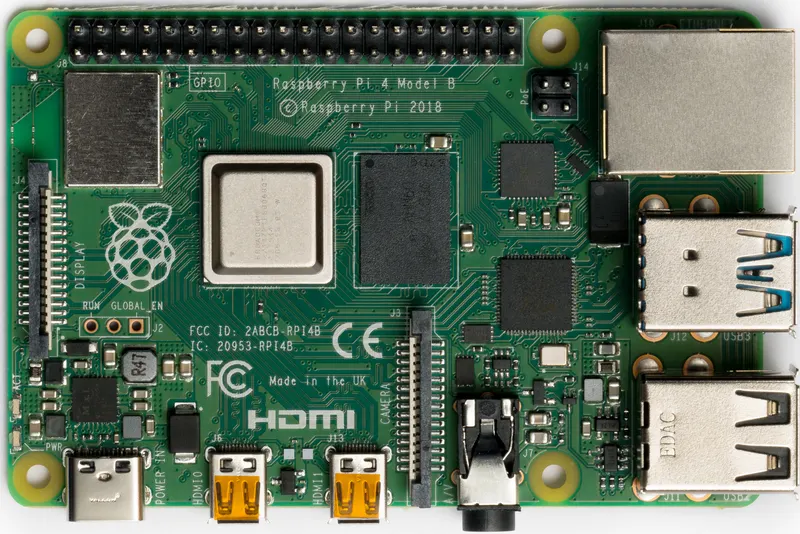

- Chip / SoC
- Broadcom BCM2711
- CPU
- 4 × Cortex-A72 (ARMv8, 64-bit)
- Clock
- 1.5 GHz at launch; 1.8 GHz in the current product brief
- RAM
- 1, 2, 3, 4 or 8 GB LPDDR4
- Storage
- microSD card; USB boot
- Wireless
- 2.4/5 GHz 802.11ac Wi-Fi; Bluetooth 5 and BLE
- I/O voltage
- 3.3 V
- Released
- June 2019
- Status
- In production
Specs checked against the cited sources on 1 October 2026 (AI-assisted source check). Spotted a mistake? Use the form at the end of the page.
Specifications
- Chip / SoC
- Broadcom BCM2711[2]
- CPU
- 4 × Cortex-A72 (ARMv8, 64-bit)[3]
- Clock
- 1.5 GHz at launch; 1.8 GHz in the current product brief[8]
- RAM
- 1, 2, 3, 4 or 8 GB LPDDR4[3]
- Storage
- microSD card; USB boot[1]
- GPU
- VideoCore VI[3]
- GPIO
- 40-pin header[2]
- I/O voltage
- 3.3 V[4]
- Input voltage
- 5 V, 3 A via USB-C[2]
- Wireless
- 2.4/5 GHz 802.11ac Wi-Fi; Bluetooth 5 and BLE[2]
- Ethernet
- Gigabit; PoE+ with a separate PoE+ HAT[2]
- USB
- 2 × USB 3.0, 2 × USB 2.0[2]
- Video
- 2 × micro-HDMI; composite on the 3.5 mm AV jack; DSI display connector[2]
- Expansion
- CSI camera connector[2]
- Launch price
- From US$35 (1 GB)[7]
Can I still use it?
- Raspberry Pi OS
- Supported[9]32-bit and 64-bit images.
- Mainline Linux
- Supported[12]A device tree for this board is in the mainline kernel; features may still be missing.
- CircuitPython
- Supported[11]
- Zephyr RTOS
- Supported[10]
As published by each project, checked weekly. A platform not listed has no published information here, which is not the same as no support.
Datasheets and documents
Pinout
- Power
- Ground
- GPIO
- Special
- Not connected
Pin table (40 pins)
| Pin | Label | Kind | Functions |
|---|---|---|---|
| 1 | 3V3 | Power | |
| 2 | 5V | Power | |
| 3 | GPIO2 | GPIO | I2C1 SDA |
| 4 | 5V | Power | |
| 5 | GPIO3 | GPIO | I2C1 SCL |
| 6 | GND | Ground | |
| 7 | GPIO4 | GPIO | GPCLK0 |
| 8 | GPIO14 | GPIO | UART TXD |
| 9 | GND | Ground | |
| 10 | GPIO15 | GPIO | UART RXD |
| 11 | GPIO17 | GPIO | |
| 12 | GPIO18 | GPIO | PCM CLK, PWM0 |
| 13 | GPIO27 | GPIO | |
| 14 | GND | Ground | |
| 15 | GPIO22 | GPIO | |
| 16 | GPIO23 | GPIO | |
| 17 | 3V3 | Power | |
| 18 | GPIO24 | GPIO | |
| 19 | GPIO10 | GPIO | SPI0 MOSI |
| 20 | GND | Ground | |
| 21 | GPIO9 | GPIO | SPI0 MISO |
| 22 | GPIO25 | GPIO | |
| 23 | GPIO11 | GPIO | SPI0 SCLK |
| 24 | GPIO8 | GPIO | SPI0 CE0 |
| 25 | GND | Ground | |
| 26 | GPIO7 | GPIO | SPI0 CE1 |
| 27 | ID_SD | Special | GPIO0, HAT EEPROM I2C SDA |
| 28 | ID_SC | Special | GPIO1, HAT EEPROM I2C SCL |
| 29 | GPIO5 | GPIO | |
| 30 | GND | Ground | |
| 31 | GPIO6 | GPIO | |
| 32 | GPIO12 | GPIO | PWM0 |
| 33 | GPIO13 | GPIO | PWM1 |
| 34 | GND | Ground | |
| 35 | GPIO19 | GPIO | PCM FS, SPI1 MISO |
| 36 | GPIO16 | GPIO | SPI1 CE2 |
| 37 | GPIO26 | GPIO | |
| 38 | GPIO20 | GPIO | PCM DIN, SPI1 MOSI |
| 39 | GND | Ground | |
| 40 | GPIO21 | GPIO | PCM DOUT, SPI1 SCLK |
Gotchas
- Use a 3 A USB-C supply. Raspberry Pi recommends its 5 V, 3 A USB-C supply; a weak supply or a thin cable triggers undervoltage warnings.[5]
- It runs warm. The BCM2711 throttles progressively under sustained load as it heats up; a heatsink or the official case fan reduces throttling.[6]
- Micro-HDMI, not HDMI. Both video outputs are micro-HDMI; you need adapters or micro-HDMI cables.[2]
- 3.3 V only. The GPIO pins are 3.3 V. Do not connect 5 V signals or components to them.[4]
- Little current per pin. Each GPIO pin can supply up to about 16 mA and all pins together about 50 mA; drive motors and other loads through a transistor or driver board.[5]
What changed
Since the Raspberry Pi 3 Model B+
| Spec | Raspberry Pi 3 Model B+ | Raspberry Pi 4 Model B |
|---|---|---|
| Chip / SoC | Broadcom BCM2837B0 | Broadcom BCM2711 |
| CPU | 4 × Cortex-A53 (ARMv8, 64-bit) | 4 × Cortex-A72 (ARMv8, 64-bit) |
| Clock | 1.4 GHz | 1.5 GHz at launch; 1.8 GHz in the current product brief |
| RAM | 1 GB | 1, 2, 3, 4 or 8 GB LPDDR4 |
| Storage | microSD card | microSD card; USB boot |
| GPU | — | VideoCore VI |
| Input voltage | 5 V via micro-USB | 5 V, 3 A via USB-C |
| Wireless | 2.4/5 GHz 802.11ac Wi-Fi; Bluetooth 4.2 and BLE | 2.4/5 GHz 802.11ac Wi-Fi; Bluetooth 5 and BLE |
| Ethernet | Up to 300 Mb/s, with Power over Ethernet support | Gigabit; PoE+ with a separate PoE+ HAT |
| USB | 4 × USB 2.0 | 2 × USB 3.0, 2 × USB 2.0 |
| Video | HDMI; composite on the 3.5 mm AV jack; DSI display connector | 2 × micro-HDMI; composite on the 3.5 mm AV jack; DSI display connector |
| Launch price | US$35 | From US$35 (1 GB) |
Next came the Raspberry Pi 5
| Spec | Raspberry Pi 4 Model B | Raspberry Pi 5 |
|---|---|---|
| Chip / SoC | Broadcom BCM2711 | Broadcom BCM2712 with Raspberry Pi RP1 I/O controller |
| CPU | 4 × Cortex-A72 (ARMv8, 64-bit) | 4 × Cortex-A76 (Armv8-A, 64-bit) |
| Clock | 1.5 GHz at launch; 1.8 GHz in the current product brief | 2.4 GHz |
| RAM | 1, 2, 3, 4 or 8 GB LPDDR4 | 1, 2, 4, 8 or 16 GB LPDDR4X |
| Storage | microSD card; USB boot | microSD card; NVMe via the PCIe connector and an M.2 HAT |
| GPU | VideoCore VI | VideoCore VII |
| Input voltage | 5 V, 3 A via USB-C | 5 V, 5 A via USB-C (5 V, 3 A with a 600 mA USB limit) |
| Wireless | 2.4/5 GHz 802.11ac Wi-Fi; Bluetooth 5 and BLE | 2.4/5 GHz 802.11ac Wi-Fi 5; Bluetooth 5 and BLE |
| Ethernet | Gigabit; PoE+ with a separate PoE+ HAT | Gigabit, with PoE+ support |
| Video | 2 × micro-HDMI; composite on the 3.5 mm AV jack; DSI display connector | 2 × micro-HDMI, dual 4Kp60 |
| Expansion | CSI camera connector | Single-lane PCIe connector; 2 × combined camera/display connectors; UART, fan and RTC battery connectors |
| Launch price | From US$35 (1 GB) | US$60 (4 GB), US$80 (8 GB) |
Power and battery
Size and mechanical
- Board size
- 85 × 56 mm[8]
History and use today
History
Launched in June 2019 from $35, the Pi 4 was the biggest jump in the family's history: a much faster SoC, USB 3.0 on a PCIe-attached controller, true gigabit Ethernet and more memory options.[7]
Still useful for
Still the default choice for Home Assistant, NAS and media-server builds, with the widest accessory and tutorial support of any Pi.
Sources
- Raspberry Pi hardware, Raspberry Pi documentation
- Raspberry Pi hardware introduction (documentation source)
- Processors, Raspberry Pi documentation
- GPIO and the 40-pin header, Raspberry Pi documentation (source)
- Power supplies, Raspberry Pi documentation (source)
- Frequency management and thermal control, Raspberry Pi documentation (source)
- Raspberry Pi 4 on sale now from $35, Raspberry Pi news
- Raspberry Pi 4 Model B product brief
- Raspberry Pi OS downloads, Raspberry Pi
- Zephyr board definition (rpi_4b)
- CircuitPython board definition (raspberrypi_pi4b)
- Linux kernel device tree (bcm2711-rpi-4-b.dts)
Spotted a mistake?
Every report is read by a person and checked against a source before anything changes. Please link one if you have it.