Raspberry Pi Pico W specs, pinout & datasheets
The Pico with an Infineon CYW43439 for 2.4 GHz Wi-Fi and Bluetooth, on the same footprint, for $6.
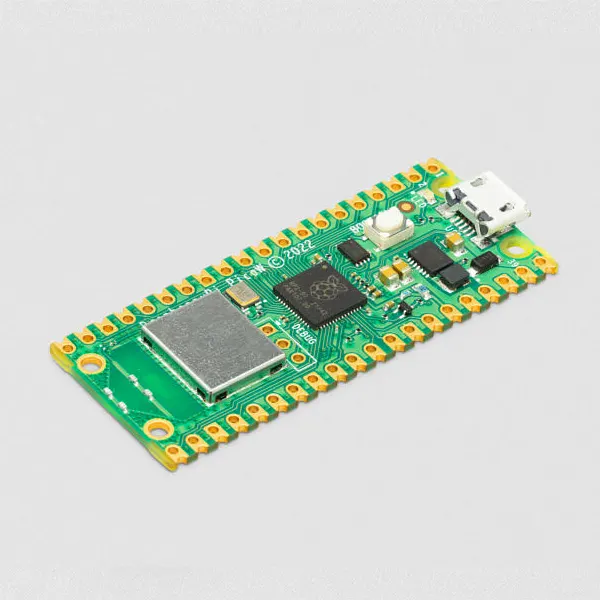

- Chip / SoC
- Raspberry Pi RP2040
- CPU
- 2 × Arm Cortex-M0+
- Clock
- Up to 133 MHz
- RAM
- 264 KB SRAM
- Flash
- 2 MB QSPI
- Wireless
- 2.4 GHz 802.11n Wi-Fi; Bluetooth 5.2 (Infineon CYW43439)
- I/O voltage
- 3.3 V
- Released
- June 2022
- Status
- In production
Specs checked against the cited sources on 1 October 2026 (AI-assisted source check). Spotted a mistake? Use the form at the end of the page.
Specifications
- Chip / SoC
- Raspberry Pi RP2040[1]
- CPU
- 2 × Arm Cortex-M0+[1]
- Clock
- Up to 133 MHz[1]
- RAM
- 264 KB SRAM[1]
- Flash
- 2 MB QSPI[1]
- GPIO
- 26 multi-function GPIO on two 20-pin edges[1]
- I/O voltage
- 3.3 V[1]
- Input voltage
- 1.8–5.5 V on VSYS; 5 V via micro-USB[1]
- Wireless
- 2.4 GHz 802.11n Wi-Fi; Bluetooth 5.2 (Infineon CYW43439)[2]
- USB
- Micro-USB 1.1 device and host[1]
- Launch price
- US$6[3]
Can I still use it?
- MicroPython
- Supported[2]
- CircuitPython
- Supported[5]
As published by each project, checked weekly. A platform not listed has no published information here, which is not the same as no support.
Datasheets and documents
Pinout
- Power
- Ground
- GPIO
- Special
- Not connected
Pin table (40 pins)
| Pin | Label | Kind | Functions |
|---|---|---|---|
| 1 | GP0 | GPIO | UART0 TX, I2C0 SDA, SPI0 RX |
| 2 | GP1 | GPIO | UART0 RX, I2C0 SCL, SPI0 CSn |
| 3 | GND | Ground | |
| 4 | GP2 | GPIO | I2C1 SDA, SPI0 SCK |
| 5 | GP3 | GPIO | I2C1 SCL, SPI0 TX |
| 6 | GP4 | GPIO | UART1 TX, I2C0 SDA, SPI0 RX |
| 7 | GP5 | GPIO | UART1 RX, I2C0 SCL, SPI0 CSn |
| 8 | GND | Ground | |
| 9 | GP6 | GPIO | I2C1 SDA, SPI0 SCK |
| 10 | GP7 | GPIO | I2C1 SCL, SPI0 TX |
| 11 | GP8 | GPIO | UART1 TX, I2C0 SDA, SPI1 RX |
| 12 | GP9 | GPIO | UART1 RX, I2C0 SCL, SPI1 CSn |
| 13 | GND | Ground | |
| 14 | GP10 | GPIO | I2C1 SDA, SPI1 SCK |
| 15 | GP11 | GPIO | I2C1 SCL, SPI1 TX |
| 16 | GP12 | GPIO | UART0 TX, I2C0 SDA, SPI1 RX |
| 17 | GP13 | GPIO | UART0 RX, I2C0 SCL, SPI1 CSn |
| 18 | GND | Ground | |
| 19 | GP14 | GPIO | I2C1 SDA, SPI1 SCK |
| 20 | GP15 | GPIO | I2C1 SCL, SPI1 TX |
| 21 | GP16 | GPIO | UART0 TX, I2C0 SDA, SPI0 RX |
| 22 | GP17 | GPIO | UART0 RX, I2C0 SCL, SPI0 CSn |
| 23 | GND | Ground | |
| 24 | GP18 | GPIO | I2C1 SDA, SPI0 SCK |
| 25 | GP19 | GPIO | I2C1 SCL, SPI0 TX |
| 26 | GP20 | GPIO | UART1 TX, I2C0 SDA, SPI0 RX |
| 27 | GP21 | GPIO | UART1 RX, I2C0 SCL, SPI0 CSn |
| 28 | GND | Ground | |
| 29 | GP22 | GPIO | I2C1 SDA, SPI0 SCK |
| 30 | RUN | Special | Reset (active low) |
| 31 | GP26 | GPIO | I2C1 SDA, SPI1 SCK, ADC0 |
| 32 | GP27 | GPIO | I2C1 SCL, SPI1 TX, ADC1 |
| 33 | AGND | Ground | |
| 34 | GP28 | GPIO | UART0 TX, I2C0 SDA, SPI1 RX, ADC2 |
| 35 | ADC_VREF | Special | ADC reference |
| 36 | 3V3(OUT) | Power | |
| 37 | 3V3_EN | Special | 3.3 V regulator enable |
| 38 | GND | Ground | |
| 39 | VSYS | Power | |
| 40 | VBUS | Power |
Pin names in firmware (30 pins)
| Chip pin | Board names |
|---|---|
| CYW0 | LED |
| CYW1 | SMPS_MODE |
| CYW2 | VBUS_SENSE |
| GPIO0 | GP0 |
| GPIO1 | GP1 |
| GPIO2 | GP2 |
| GPIO3 | GP3 |
| GPIO4 | GP4 |
| GPIO5 | GP5 |
| GPIO6 | GP6 |
| GPIO7 | GP7 |
| GPIO8 | GP8 |
| GPIO9 | GP9 |
| GPIO10 | GP10 |
| GPIO11 | GP11 |
| GPIO12 | GP12 |
| GPIO13 | GP13 |
| GPIO14 | GP14 |
| GPIO15 | GP15 |
| GPIO16 | GP16 |
| GPIO17 | GP17 |
| GPIO18 | GP18 |
| GPIO19 | GP19 |
| GPIO20 | GP20 |
| GPIO21 | GP21 |
| GPIO22 | GP22 |
| GPIO26 | GP26_A0, GP26, A0 |
| GPIO27 | GP27_A1, GP27, A1 |
| GPIO28 | GP28_A2, GP28, A2 |
| GPIO29 | VOLTAGE_MONITOR, A3 |
Gotchas
- The LED is on the wireless chip. The on-board LED is driven by the CYW43439 wireless chip (WL_GPIO0), not a GPIO, so Pin(25) code from the original Pico does not light it; in MicroPython use machine.Pin('LED').[4]
- Some pins are taken by the radio. GPIO23, 24, 25 and 29 are used internally to talk to the wireless chip; GPIO29 also measures VSYS/3.[1]
What changed
Since the Raspberry Pi Pico
| Spec | Raspberry Pi Pico | Raspberry Pi Pico W |
|---|---|---|
| Analog | 3 ADC inputs (12-bit) | — |
| Wireless | — | 2.4 GHz 802.11n Wi-Fi; Bluetooth 5.2 (Infineon CYW43439) |
| Dimensions | 51 × 21 mm | — |
| Launch price | US$4 | US$6 |
Next came the Raspberry Pi Pico 2
| Spec | Raspberry Pi Pico W | Raspberry Pi Pico 2 |
|---|---|---|
| Chip / SoC | Raspberry Pi RP2040 | Raspberry Pi RP2350 |
| CPU | 2 × Arm Cortex-M0+ | 2 × Arm Cortex-M33 or 2 × Hazard3 RISC-V (chosen at boot) |
| Clock | Up to 133 MHz | Up to 150 MHz |
| RAM | 264 KB SRAM | 520 KB SRAM |
| Flash | 2 MB QSPI | 4 MB QSPI |
| Wireless | 2.4 GHz 802.11n Wi-Fi; Bluetooth 5.2 (Infineon CYW43439) | — |
| Launch price | US$6 | US$5 |
History and use today
History
Released in June 2022, the Pico W put 2.4 GHz Wi-Fi on the Pico for $2 more; Bluetooth was not enabled at launch.[3]
Still useful for
The cheapest well-supported way to put a MicroPython or C project on Wi-Fi, from sensors to Home Assistant integrations.
Projects from the archive
Sources
- Raspberry Pi Pico W datasheet
- Pico-series microcontrollers, Raspberry Pi documentation
- Raspberry Pi Pico W: your $6 IoT platform, Raspberry Pi news
- Connecting to the Internet with Raspberry Pi Pico W
- CircuitPython board definition (raspberry_pi_pico_w)
- MicroPython board definition (RPI_PICO_W)
- CircuitPython pin definitions (raspberry_pi_pico_w)
Spotted a mistake?
Every report is read by a person and checked against a source before anything changes. Please link one if you have it.